Quickstart
This page walks through a complete gt4py.next computation: a Laplacian on a
two-dimensional Cartesian grid. It takes a few minutes to read and every code
cell is executed when the documentation is built, so what you see is the actual
output.
Installation
GT4Py is a regular Python package:
pip install gt4py
This is all that is needed to run computations in Python. To compile them with
the gtfn_cpu backend, used later on this page, a C++ compiler supporting
C++17 must also be available on the system.
Dimensions
In GT4Py, the axes of the grid have names. A dimension is created once, and it is then used to declare fields, to move between grid points, and to select the region where a computation runs.
import numpy as np

import gt4py.next as gtx

I = gtx.Dimension("I")
J = gtx.Dimension("J")
Fields
A field is an array whose axes are labeled with dimensions. The set of grid points where it is defined is its domain: a range of indices for each dimension.
gtx.as_field creates a field from the data of an existing array, and
gtx.zeros allocates a new one:
nx, ny = 64, 48
domain = gtx.domain({I: nx, J: ny})

i, j = np.meshgrid(np.arange(nx), np.arange(ny), indexing="ij")
phi = gtx.as_field(domain, np.sin(2 * np.pi * i / 16) * np.sin(2 * np.pi * j / 12))
lap_phi = gtx.zeros(domain)

print(phi.domain)
Domain(I[horizontal]=(0:64), J[horizontal]=(0:48))
The output lists, for each dimension, its kind and its range of indices
(start:stop, with stop excluded). Here domain covers all the points of
the grid.
A field operator
Computations are written as field operators: Python functions decorated with
@gtx.field_operator, which take fields and return fields. There are no loops
and no indices inside. An expression describes the result at every grid point.
Neighboring points are reached by calling a field with an offset along a
dimension, an operation called premap. For example, phi(I + 1) is the value
of phi at the next point in the I direction.
This is the five-point Laplacian (with unit grid spacing):
IJField = gtx.Field[gtx.Dims[I, J], gtx.float64]


@gtx.field_operator
def laplacian(phi: IJField) -> IJField:
    return phi(I + 1) + phi(I - 1) + phi(J + 1) + phi(J - 1) - 4.0 * phi
The type annotations are part of the definition: they declare the dimensions and the data type of the arguments and of the result.
Running it
A field operator is called with its arguments plus out, the field where the
result is written. The call itself returns nothing. The Laplacian needs one
neighbor on each side, so it can only be computed in the interior of the grid.
The domain argument selects those points:
interior = {I: (1, nx - 1), J: (1, ny - 1)}

laplacian(phi, out=lap_phi, domain=interior)
The points of lap_phi outside interior have not been touched. asnumpy()
returns the data as a NumPy array, for example to plot it.
import matplotlib.pyplot as plt

fig, axes = plt.subplots(1, 2, figsize=(9, 3.2), constrained_layout=True)
for ax, field, title in zip(axes, (phi, lap_phi), ("phi", "laplacian(phi)")):
    data = field.asnumpy().T
    image = ax.imshow(data, origin="lower", cmap="RdBu_r", vmin=-1.0, vmax=1.0)
    ax.set(title=title, xlabel="I", ylabel="J")
fig.colorbar(image, ax=axes);
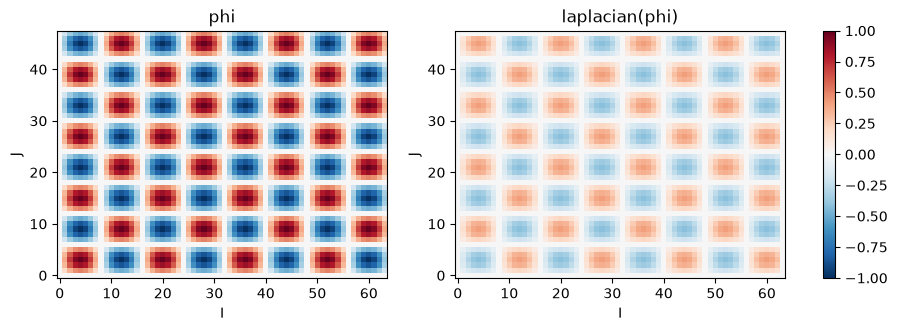
No backend was selected, so this call was executed directly in Python, with the operations on fields evaluated by NumPy. We call this embedded execution. It is the default, it needs no compilation, and it can be debugged like any other Python code.
Compiling with a backend
The same field operator can be compiled to optimized code by a backend.
with_backend returns a new version of the operator bound to that backend, here
gtx.gtfn_cpu, which generates C++ code using the
GridTools library.
The backend can also be passed as allocator when creating fields, so that
they get the memory layout the backend prefers:
laplacian_cpu = laplacian.with_backend(gtx.gtfn_cpu)

phi_cpu = gtx.as_field(domain, phi.asnumpy(), allocator=gtx.gtfn_cpu)
lap_phi_cpu = gtx.zeros(domain, allocator=gtx.gtfn_cpu)

laplacian_cpu(phi_cpu, out=lap_phi_cpu, domain=interior)

np.allclose(lap_phi_cpu.asnumpy(), lap_phi.asnumpy())
True
The first call generates and compiles the code, which takes a few seconds. Later calls reuse the compiled version. Neither the definition of the operator nor the way it is called changes.
Important
By default, GT4Py compiles in separate processes. In a script, the code that
calls a compiled operator must therefore be under if __name__ == "__main__":,
as required by the Python multiprocessing module. Notebooks and interactive
sessions do not need it.
Exploring fields in Python
The expressions used inside a field operator also work on fields in plain Python, which is handy for exploring and debugging:
d_phi = phi(I + 1) - phi

print(d_phi.asnumpy().max())
0.3826834323650902
Where to go next
Grids and fields: dimensions, domains, allocation of fields, and connectivities of unstructured meshes.
GT4Py DSL: what can be written inside operators.
Field operators: types, expressions, conditionals and built-in functions.
Premap and neighbors: Cartesian offsets and unstructured meshes.
Scan operators: computations which advance along the vertical.
Programs: grouping several operator calls.
Executing GT4Py programs: embedded execution, backends and compilation.